


Laptop Trackpad Repair: Is a Full Replacement Always Necessary After a Spill?
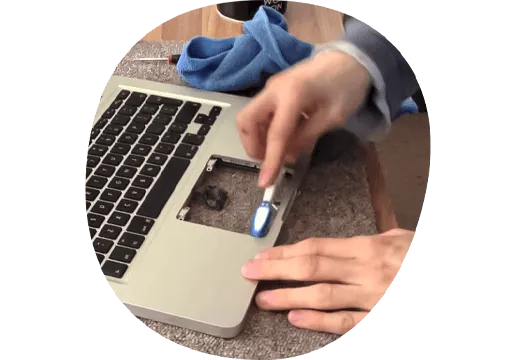
We have all been there, that moment when water, coffee, sodas, or other liquids are spilled upon your laptop computer. Your heart sinks, and you immediately think of the expensive laptop trackpad repair in store for you. A failed trackpad is one of the most frequent symptoms of liquid damage. But must every spill now mean new teething problems with your computer?
Knowing precisely how far the liquid reached and what remedies are available can save you time, money, and much unnecessary stress. This tutorial provides not only a summary of what actually occurs when fluids meet your laptop. But it offers practical advice on immediate steps to repair any damage that may have already occurred and to determine whether merely cleaning the keyboard with a lint-free cloth will suffice or if replacement of the entire unit is required.
Steps to Take Immediately After Your Laptop Gets Wet
The quicker you act after your laptop has been soaked in liquid, the better. In a few minutes, reaction time could mean the difference between needing to fix a minor glitch and undertaking a major laptop trackpad refurbishment.
-
Cut Power & Get Rid of Source: Don't wait until it shuts down normally. Use the power button to turn it off immediately. Remove the power cord and all attached peripherals. This is vital in avoiding a short circuit.
-
Unplug It and Turn It Over: Gently turn the computer upside down, preferably into an upside-down "V" configuration for the liquid to escape. Keep off shaking or jerking it too much, as this might spread fluid onto other elements within the portable device.
-
Disconnect the Battery (If Possible): If your battery can be removed by the user, take it out. For today’s sealed-lid laptops, this process may require professional assistance. However, shutting down is the next best.
-
Removing Excess Moisture: The outside of the computer should be gently patted dry, using a soft cloth or eyeglasses cleaner on its surface. It should not be dried with a hair-dryer as the air is too hot and could damage internal parts.
Diagnosing the Damage: Trackpad Issues vs. Motherboard Failure
After a spill, it's important to ascertain just what exactly is broken. A sticky laptop trackpad or one that doesn't respond to touch might only suffer from a localized problem. However, if your laptop won't turn on at all or the screen is blank, with both the keyboard and the trackpad malfunctioning.
Then, there will be an entirely different level of repair needed for trackpad issues. A professional technician can run diagnostics and find out whether the fault is limited to a trackpad's ribbon cable and connector or if liquid has eaten away at essential circuits on the motherboard. This second case would involve a much different type of repair and be far more expensive.
Your Laptop Trackpad Repair Options: Cleaning vs. Full Replacement
When a technician opens your laptop, they can evaluate the degree of corrosion.
A Thorough Cleaning
In case the spill was minor and cleaned up promptly, a good internal wash with isopropyl alcohol may be what will be required. This involves disconnecting the trackpad and cleaning its connector and the area around it from any residue that is causing the short circuit of the laptop touchpad. This is the cheapest solution.
Full Trackpad Replacement
If the internal circuitry of the trackpad is corroded, then your only choice is to replace it. Repair will not be a good option. Thus, technicians will get a compatible part and install it in your laptop. Meanwhile, they will ensure its compatibility with your laptop system.
Conclusion
A spilled drink doesn't have to be the end of your laptop's trackpad, nor does it have to entail an unmanageable financial burden. The key thing is to move quickly yet methodically so that what starts as just a little water droplet in one corner may not turn into an afternoon's worth of mopping.
With a simple cleaning, a sticky laptop trackpad can be fixed after a spill. But if the damage is past that stage and requires a professional laptop trackpad repair, then your small case might become much bigger still. The most important thing is not to assume the worst.
Get a professional diagnosis by a trusted technician, like iFix Laptop Repair, who can tell you whether what you need is a deep clean or a full replacement. In this way, you will be aware of the alternatives to choose from. Thus, make an informed decision that will restore functionality to your laptop without unnecessary expenses and get back to work.
 Russian
 English
 Arabic
 French
 Spanish
 Portuguese
 Deutsch
 Turkish
 Dutch
Dutch
 Italiano
 Romaian
 Portuguese (Brazil)
 Greek
Greek