


QuickBooks Enterprise Solutions: How to Set Up and Use Alternate Vendors?
The feature of Alternate Vendors in QuickBooks Desktop allows users to associate multiple vendors with a specific inventory item. This feature gives users the prerogative to opt for different vendors for purchasing the same item based on availability, pricing, and other variegated factors. This walkthrough shall guide readers through the lucid process of using alternative vendors in QuickBooks Enterprise. Make sure to follow the instructions carefully.
How to View Vendor Items?
It should be noted that each purchase dating back up to 12 months, whether an inventory or non-inventory purchase gets reported. It encapsulates the amount, and the date of purchase as well. The easy process to view Vendor Items is:
- Start off by clicking on the Vendors option. From here, the user should be able to access the Vendor Centre.
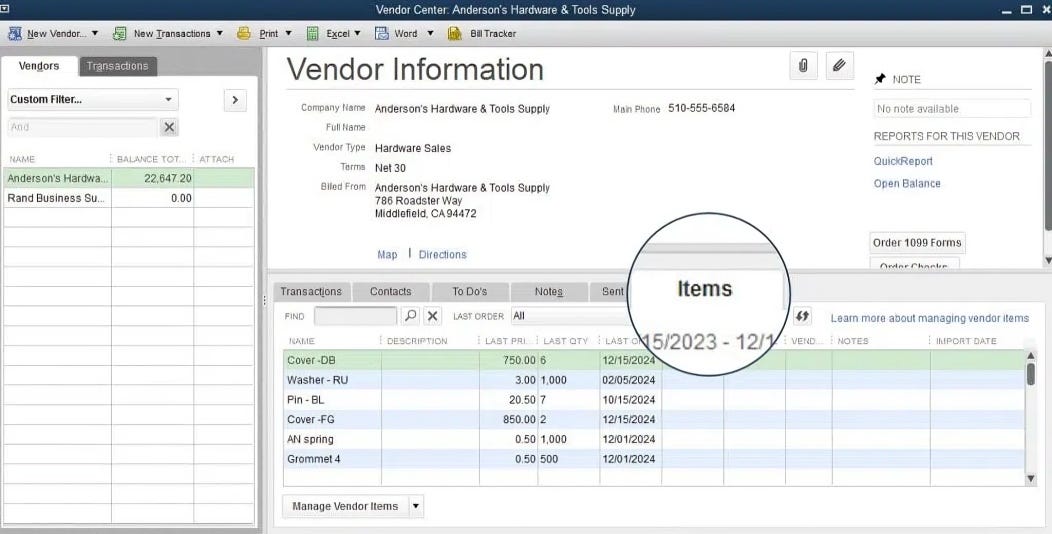
- Follow up by choosing the desired vendor and then heading to the Items tab.
Steps for uploading Vendor Price Lists
The set of steps to upload vendor price lists are given below:
- Start by opting for the Vendors option.
- Follow up by navigating to the Vendor Centre, and then tapping on the Items tab.
- The user is then required to opt for the option to Import from Excel and select the appropriate file.
Procedure for choosing Alternate Vendors for Inventory
One single inventory item can subsume four distinct vendors. This simplifies the process of opting for the preferred vendors when creating purchase orders for specific items. Following the steps discussed below should help the user to choose Alternate Vendors for Inventory.
- In the beginning, the user should head to Lists.
- Proceed by choosing an item from the available options, followed by hitting on the Edit item tab.
- The subsequent step requires clicking on the Manage Vendors option and then adding the vendors to the item inventory.
 English
 Arabic
 French
 Spanish
 Portuguese
 Deutsch
 Turkish
 Dutch
Dutch
 Italiano
 Russian
 Romaian
 Portuguese (Brazil)
 Greek
Greek